
Where’s My Order? What to Email Customers While They Wait
A customer orders a gift. They get an “Order received” email, but they still do not know if the carrier has the parcel or whether it will arrive before New Year. The next message should answer those questions before they have to search your site or call your store. Here is how to work out a realistic holiday window and what to email between checkout and delivery.
Table of contents:
- How long does holiday delivery take?
- How to set a last order date
- Email 1: confirm the order, not the shipment
- Email 2: the parcel is with the carrier
- Email 3: explain a delay before the customer has to ask
- How to set it up in WooCommerce
- Frequently asked questions
- Does the customer know what happens next?
How long does holiday delivery take?
There is no single delivery time that applies to every store. Count the time your store needs to prepare the order, the wait for the next collection, and the time the carrier needs to deliver it. Holiday hours, the address, the service you use and product availability all matter. One business day is not necessarily 24 hours from the moment someone clicks “Place order”.
For example, Serbia Post's Post Express business service measures its next-business-day service from when the parcel is handed over. The clock does not start at checkout. If an item is out of stock or made to order, show its lead time separately on the product page.
In Serbia, 1 and 2 January and 7 January are public holidays when businesses generally close (Serbian Ministry of Labour holiday calendar). That alone does not tell you whether a carrier collects on 31 December, operates on Saturdays or runs a reduced service on a particular route. Check your own carrier's local holiday schedule and confirm the final collection before putting a date on your website.
Example: ordered on 30 December, delivered in January
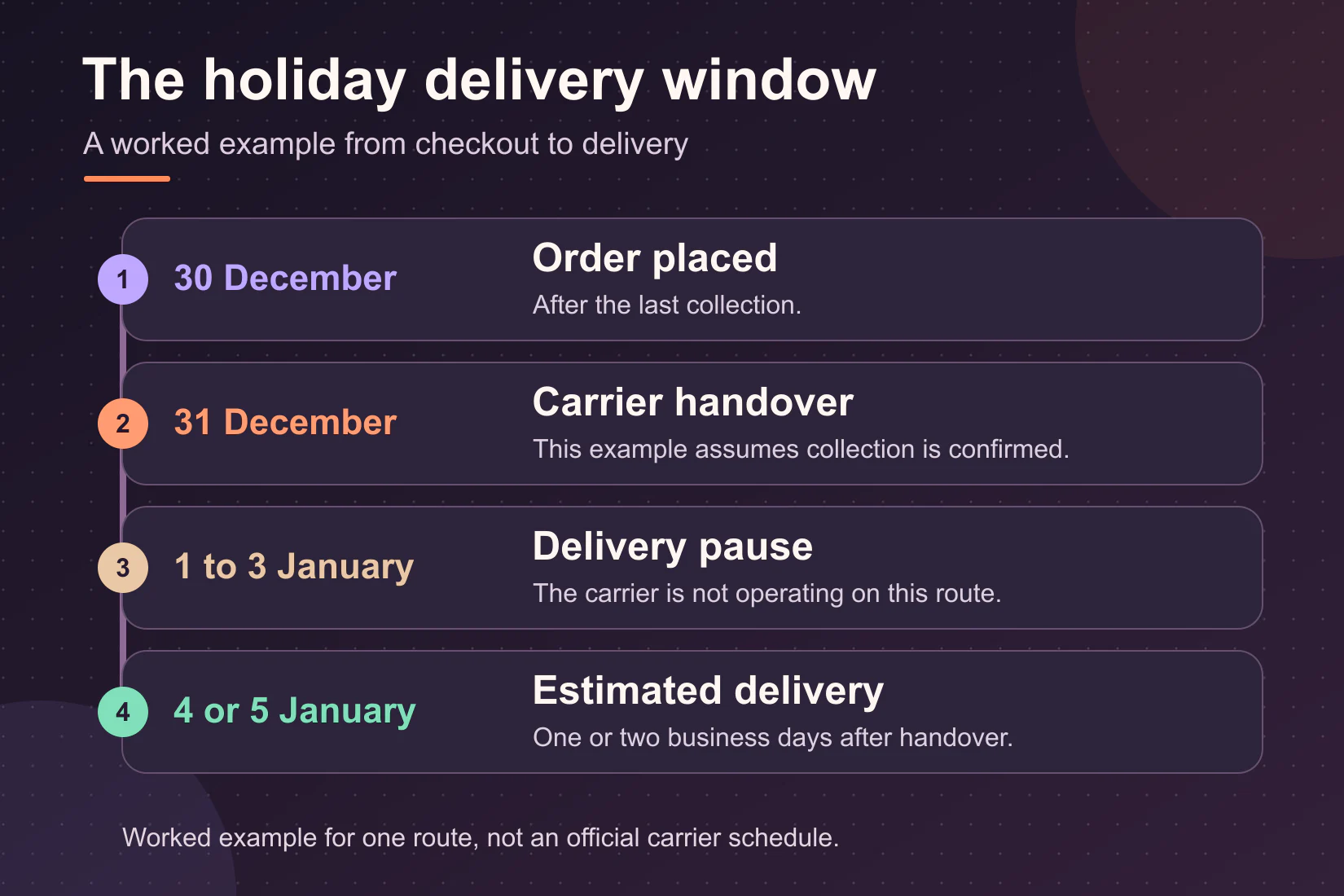
Suppose a customer orders on Wednesday, 30 December 2026, after the last collection. The store hands the parcel over on Thursday, 31 December. If that collection is confirmed, the carrier does not operate on this route for the next three days, and transit takes one to two business days, the estimate is Monday, 4 January or Tuesday, 5 January. That is five to six calendar days from the order date. If there is no collection on 31 December, the estimate moves back. This is a worked example, not a published carrier schedule.
How to set a last order date
- Start with the date the buyer needs the parcel, such as 31 December. Check whether the carrier delivers to the destination on that day.
- Work backwards. Allow for travel time on the route, preparation at your store and the confirmed collection. Skip days your warehouse or the carrier is closed. Build in some extra time if you expect a rush.
- Publish the cutoff date and time, which products and areas it applies to, and what changes once the cutoff passes. If you are not sure a parcel will arrive before the holiday, say so plainly.
Show the estimate on the product page and again before payment, not just in a banner. If an order includes an in-stock product and a made-to-order item, say whether they will arrive together or separately. If shipping is no longer realistic, show store pickup or a digital gift card only if you actually offer it.
Email 1: confirm the order, not the shipment
Send this when the store receives an order. Include the order number, items, total, whether payment is confirmed or due on delivery, and what happens next. If you know when the parcel should leave, give that date as an estimate. An order received is not a parcel shipped.
Subject: We received order #1048
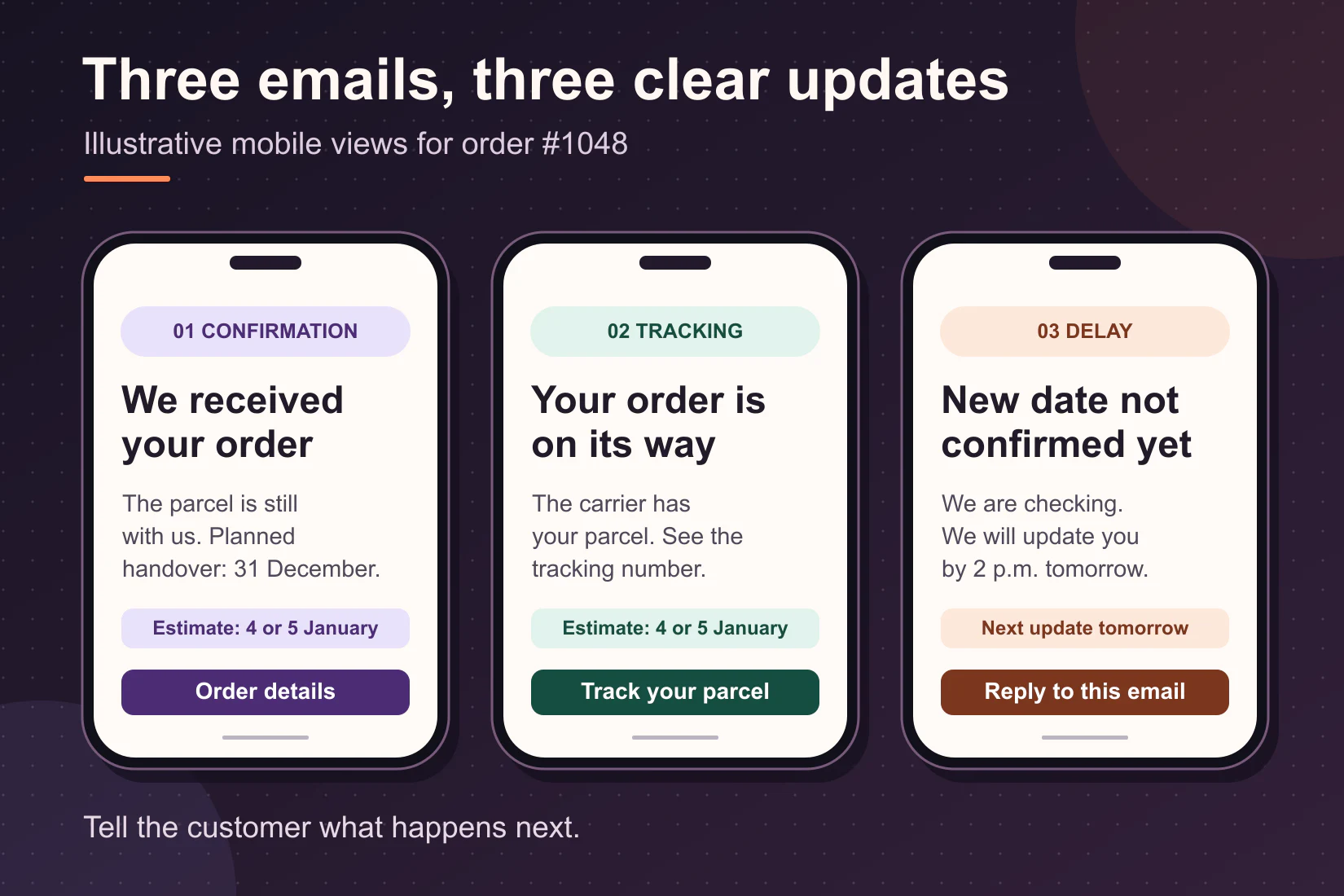
“Thank you for your order! We have received order #1048: [items and quantities]. Total including shipping: [amount]. You will pay on delivery, and the parcel is still with us. We plan to hand it over to the carrier on 31 December. Estimated delivery is 4 or 5 January. We will email your tracking link as soon as we hand the parcel over. If you have a question, reply to this email.”
Email 2: the parcel is with the carrier
Send this once the parcel is actually with the carrier, not when you print a label. Name the carrier, include the tracking number and use a button that goes straight to tracking. Write the number as text so the customer can still use it if the button does not open. If the first update is not live yet, explain that it will appear once the carrier records the parcel.
Subject: Order #1048 is on its way
“We handed your parcel over to the carrier on 31 December. Tracking number: [tracking number]. Under the holiday schedule, we expect delivery on 4 or 5 January. Follow the tracking link for the latest update.”
Button text: “Track your parcel”. In your live email, replace the placeholder with the real number and carrier link. If the order ships in two parcels, tell the customer what is in each and share both tracking numbers as soon as they are available.
Email 3: explain a delay before the customer has to ask
Get in touch as soon as you know the original estimate will not hold. Say what you know, give a new estimate only if you have enough information, and say when you will update them again. If the order is a gift with a hard deadline, tell the customer how to contact you to discuss their options. Do not send a vague blanket message to everyone.
Subject: A delivery update for order #1048
“We are sorry, but your parcel will not arrive on 4 or 5 January as we expected. The carrier has not confirmed a new date yet. We are checking and will update you by 2 p.m. tomorrow, even if we do not have a final answer. If it is a gift and the date matters, reply to this email.”
If you have a reliable new estimate, share it. If there is no news by the time you promised, send a short update anyway. Only promise a follow-up time if someone on your team can meet it.
How to set it up in WooCommerce
In your admin area, open WooCommerce → Settings → Emails. The WooCommerce email guide explains which messages are triggered when an order status changes. Check card payments and cash on delivery separately. If one order is delayed, you can send a customer note from the order screen.
For tracking, use your carrier's integration or a tool such as the WooCommerce Shipment Tracking extension. Check the exact event that sends the email. If you print labels before collection or ship orders in several parcels, do not let creating a label mark a whole order as shipped. Also check that the store and extension are not sending the same message twice.
Place a test order before the holidays
- Order as a guest on your phone and check the emails for card payment and cash on delivery. The status must match what actually happened.
- Open the tracking link and check that it goes to the right parcel rather than the carrier's homepage.
- Reply to the email. Make sure it goes to an inbox someone checks.
- Try reading the message without images. The date, order number and contact instructions must still be visible.
Frequently asked questions
When does the carrier's delivery estimate start?
It depends on the service terms, usually when the carrier accepts the parcel. Ordering and packing are not part of transit time. Show the customer the full estimate from ordering to delivery.
What if tracking has not updated?
Check whether the parcel was collected and when it last received a scan. If it is past the estimated delivery date, contact the customer and say when you will update them. A missing scan does not mean the parcel is lost.
Should these emails include holiday discounts?
These emails are about a specific order. Keep them separate from newsletters: the buyer is looking for the order number, a date and the next step. For campaigns and delivery to the inbox, see our email marketing guide.
Does the customer know what happens next?
Every message should answer three questions: where the order is, what happens next and when the customer will hear from you again. At the holidays, the most useful email may be the one that tells someone early enough that their parcel will not arrive by the date they expect.
If your store emails do not reflect what is happening in your warehouse or with the carrier, get in touch. We can review your online store's order flow and help you make the messages clearer.

 Let's talk about your project!