
Card Payments on a Website in Serbia: How It Works and What You Need
A customer picks a product, reaches checkout and looks for the “Pay by card” button. If it isn't there, some customers leave and the rest choose cash on delivery, so you only see the money once the courier delivers the parcel. Turning on card payments in Serbia isn't complicated once you know the order of things: a contract with a bank, a few mandatory elements on the site and connecting your checkout to the bank. This guide explains how card payments work, what the bank checks, what it costs and how cards compare with IPS and cash on delivery. The examples come from stores we have connected to banks, from Quinton to DD Moto.
Table of contents:
- How card payments work
- How much Serbia pays by card online
- What you need before talking to a bank
- What the bank checks on your site
- What it costs
- Card, IPS, cash on delivery or bank transfer
- From application to first payment
- Cards on WooCommerce and custom sites
- Fiscal receipts and refunds
- Mistakes we have seen on projects
- FAQ
- In short
How card payments on a website work
Every payment involves three parties: your website, the bank you have a contract with (it accepts card payments and pays you out) and the bank that issued the customer's card. The customer sees none of this. For them it's a few clicks and one confirmation on their phone.
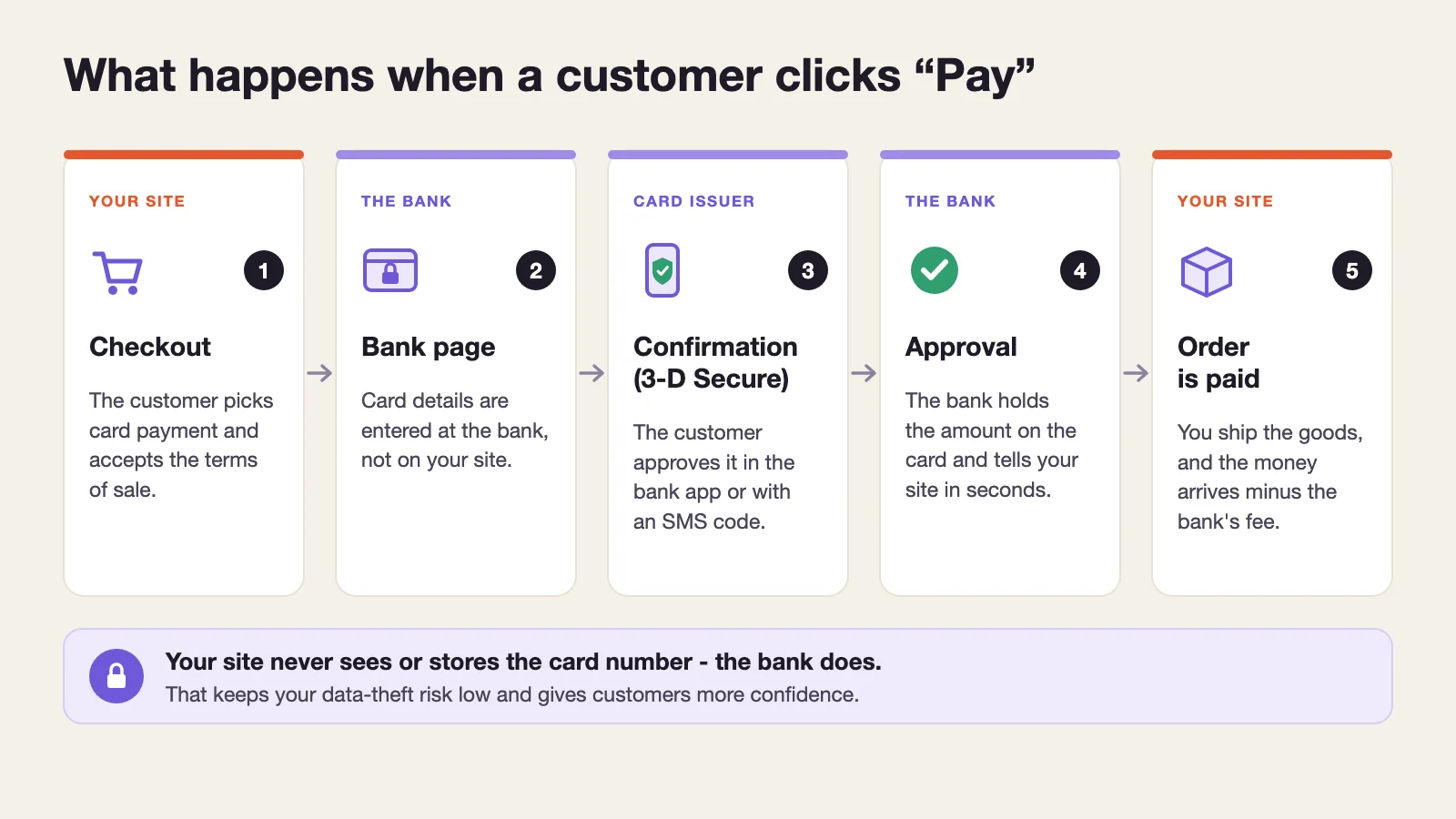
When the customer clicks “Pay”, most banks have your site send them to the bank's payment page, while with some the bank's window opens inside your checkout. Either way, the card number, expiry date and security code are entered at the bank. Then the customer's own bank asks them to confirm the payment, usually in its mobile app or with an SMS code. This is 3-D Secure, which customers know as Visa Secure or Mastercard ID Check. Since 6 May 2025 this extra confirmation has been mandatory for online payments in Serbia.
Once the customer confirms, the bank holds the amount on their card and tells your site within seconds that the payment went through. The order is marked as paid, the customer gets an email confirmation, and the money reaches your account later, minus the bank's fee. At banks that state it publicly, such as NLB and Halkbank, that is the next business day.
The most reassuring part: the card number never passes through your site. Banks actually forbid it - a merchant may not ask for, store or copy the card number, expiry date or security code. If someone ever breaks into your site, your customers' card details simply aren't there.
Charge now or after shipping
Usually the money is taken as soon as the customer confirms. Some banks also offer a hold with later capture: the amount is first reserved on the card and you charge it when you ship. That helps when you aren't sure an item is in stock, or when you only know the exact amount while packing.
How much Serbia pays by card online
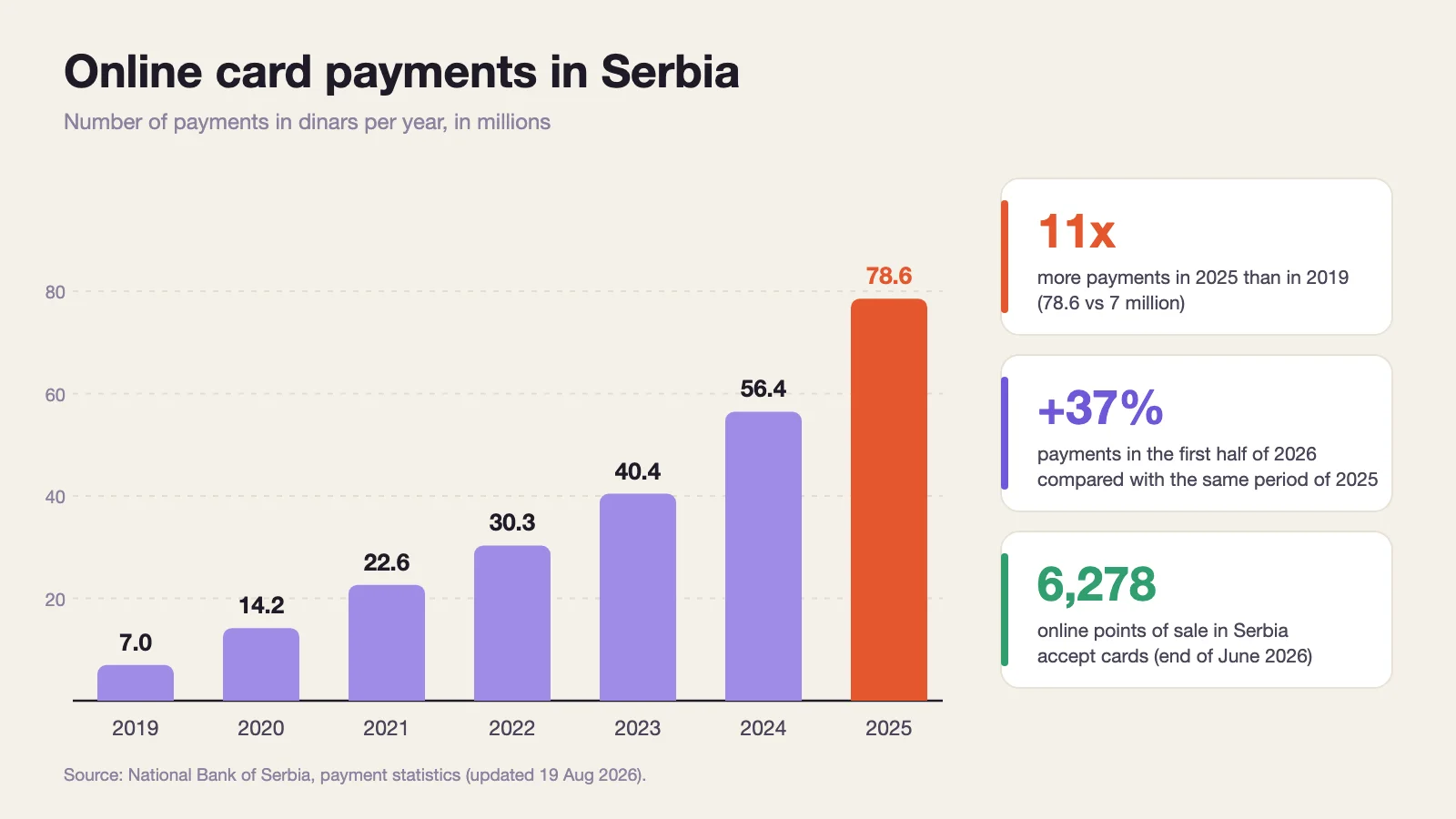
Figures from the National Bank of Serbia show how fast habits are changing. In 2019 shoppers paid online by card in dinars about 7 million times. In 2025 there were 78.6 million such payments, worth a total of 237 billion dinars. Growth continues this year: the first six months of 2026 saw 48.2 million payments, 37% more than in the same period last year.
The number of merchants accepting cards is growing too. At the end of June 2026 Serbia had 6,278 online points of sale with a domestic bank or payment institution, 21% more than a year earlier (NBS statistics).
Nobody officially measures how many people still choose cash on delivery - the NBS notes that it has no data on it. So treat percentages that circulate online without a source with caution.
What you need before talking to a bank
Before you apply, check that you have the basics in place. Banks in Serbia mostly ask for the same things:
- A registered company or sole proprietorship. A private individual can't accept cards on a website.
- A business account. Many banks require the account to be with them, for example OTP and Halkbank. If you don't want to switch banks, Payspot works with a dinar account at any bank in Serbia.
- At some banks, a track record: OTP requires at least 12 months of business, counted from registration with the Business Registers Agency (APR).
- A working website with prices in dinars and all the terms-of-sale pages. The bank reviews the site before switching cards on, so a site that is “under construction” won't pass.
- A secure connection (HTTPS, the padlock in the address bar) across the whole site.
In the application, the bank usually asks about expected turnover, your cheapest and most expensive product, the delivery method and how many days after payment the customer receives the goods. Prepare these figures in advance, because the bank uses them to assess risk and make its offer.
Besides banks, electronic money institutions such as Payspot and ChipCard can also enable card payments for you. There are also technical intermediaries, such as Monri and AllSecure, that connect your site to several banks.
What the bank checks on your site
Before it switches on live payments, the bank reviews your site against its checklist. The lists differ in detail, but the substance is the same at every bank whose instructions we went through: Intesa, OTP, UniCredit and Raiffeisen. This is what must be there:
| What | Where on the site | Note |
|---|---|---|
| Company details | Footer or Contact page | Full name, address, registration number, tax ID, activity code, phone and email |
| Prices in dinars | Products, cart, checkout | Prices in foreign currency may be shown for information only |
| Currency conversion statement | Terms of sale | Tells customers with foreign cards that they pay in dinars and their bank sets the exchange rate |
| Delivery | Separate page | Delivery times, cost, where you ship and any restrictions |
| Complaints and refunds | Terms of sale | Refunds go only to the card used for payment |
| Privacy and payment data protection | Separate pages | A statement that your system never sees card details |
| VAT statement | Next to prices or in the terms | “VAT included in the price” or that the company is not VAT registered |
| Card, bank and 3-D Secure logos | Footer and payment choice | The bank logo links to the bank's site, security programs sit apart from card logos |
| Consent to the terms | Checkout, before the pay button | Payment must not go through without the checkbox |
| Payment confirmation | Page after payment and email | Payment outcome, order number, authorization code and merchant details |
Sources: e-commerce merchant instructions from Banca Intesa and OTP Bank, UniCredit Bank's special terms and our project with Raiffeisen Bank.
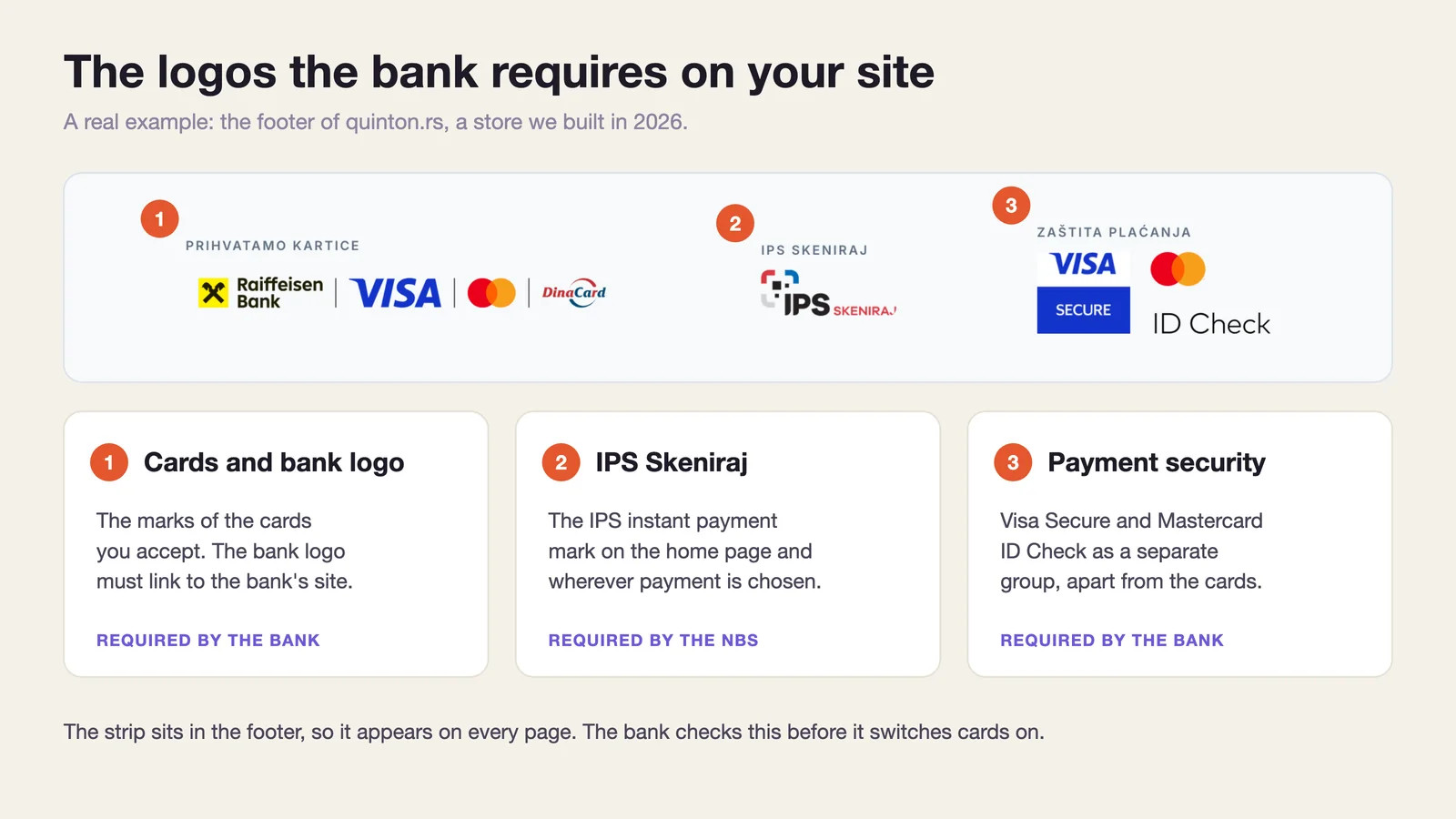
On the Quinton store, which we connected to Raiffeisen Bank this year, the logo strip sits in the footer (image below). The bank requires the logos on the home page and on every page that mentions payment methods, and the footer is the one place that exists on every page.
Details the bank pays attention to: logos must keep their original colors, so on Quinton we kept the strip light even though the footer is dark blue. The bank logo links to the bank's website, while Visa Secure and Mastercard ID Check form a separate group, apart from the card logos. Even the sizes are prescribed: a card mark may not be smaller than 37 x 23 pixels.
You have to show your company details anyway under Serbia's Law on Electronic Commerce. That is why we put them in the footer of our own site too, even though we don't sell anything through it.
What it costs
Costs come in two kinds: the bank's fee on every payment and charges for the service itself. The per-payment fee isn't shown in price lists because no law caps it - you agree on it with the bank. The law only caps the fee between the two banks (0.2% for debit and 0.3% for credit cards), and that is just one part of your fee.
That's why price lists show a ceiling, not the real price. Intesa's price list, valid from 1 June 2026, says “up to 15%”, and the actual percentage only appears in your contract. For orientation: the average card fee in Serbia fell from 2.11% in 2018 to 1% at the end of 2024. That is an average across all merchants, in shops and online, so treat it as a starting point for talking to the bank, not a promise.
| Item | How much | Examples |
|---|---|---|
| Fee on every card payment | Agreed with the bank | Average for all cards in Serbia: 1% (NBS, end of 2024) |
| Service activation | RSD 0 to 200,000, one-off | Raiffeisen: no fee. Intesa: up to RSD 200,000, free with Biz account packages |
| Monthly fee | RSD 0 to 4,000 | OTP: no fixed monthly costs. Raiffeisen: first 6 months without the monthly fee. Intesa: up to RSD 4,000, free with BizComfort and BizPro |
| Fee for IPS payments | Usually lower than for cards | NBS example: 0.3% for customers of the same bank, 0.5% for customers of other banks |
Sources: NBS (March 2025), Intesa's price list for companies and sole proprietors (valid from 1 June 2026), Raiffeisen and OTP bank websites and the NBS IPS site, checked 24 September 2026.
A worked example: on a 5,000 dinar order with a 1.5% fee, the bank keeps 75 dinars. If the customer pays the same order via IPS with a 0.5% fee, it's 25 dinars.
A card surcharge is forbidden, a discount is allowed
You may not charge customers extra because they pay by card. You may, however, give a discount for a cheaper payment method (Law on Payment Services, Article 41). If IPS works out cheaper for you, you can encourage it with a small discount.
Subsidy: the “Bolji način” program
In 2026 a new round of the “Bolji način” program is running, and it covers online sales too. Sole proprietors and small merchants who had no POS terminal in the last 12 months can get up to 12 months of fees capped at 0.5% for Visa and Mastercard cards. The subsidy ends early if turnover doesn't reach 60,000 dinars in the first six months or if it exceeds 1,500,000 dinars. Check with your bank whether it takes part.
Don't forget the work on the site
Besides the bank, budget for one-off work on the site: connecting the plugin or API, terms-of-sale pages, logos, confirmations and testing. The cost depends on the platform and on how ready the site already is. We cover typical store build prices in How much does a website cost in 2026.
Card, IPS, cash on delivery or bank transfer
Cards aren't the only way a customer can pay you. Here is how the four most common methods compare from the merchant's point of view:
| Payment method | When the money arrives | What it costs you | Watch out for |
|---|---|---|---|
| Card | Usually the next business day | The bank's fee, negotiated | Disputed payments: keep proof of delivery |
| IPS (QR code) | Instantly | Two to three times less than cards | The customer needs mobile banking |
| Cash on delivery | When the courier delivers and pays out the collected amount | The courier's cash-on-delivery fee | The customer can refuse the parcel, and the shipping cost stays with you |
| Bank transfer | When the customer pays | No fee | Matching payments to orders by hand |
IPS: NBS data. The payout time for cash on delivery depends on your contract with the courier.
IPS is a special advantage. The customer scans a QR code with their bank's app, the money reaches you instantly, and according to the NBS the fee is two to three times lower than for cards. On top of that, every bank that enables online card payments for you must also offer IPS, so ask for it in the same package.
Our advice for most small stores: card and IPS for customers who want to pay right away, cash on delivery for those who don't yet trust paying online. Bank transfer makes sense for companies and larger orders, with a payment reference so each payment is easy to match to its order.
From application to first payment
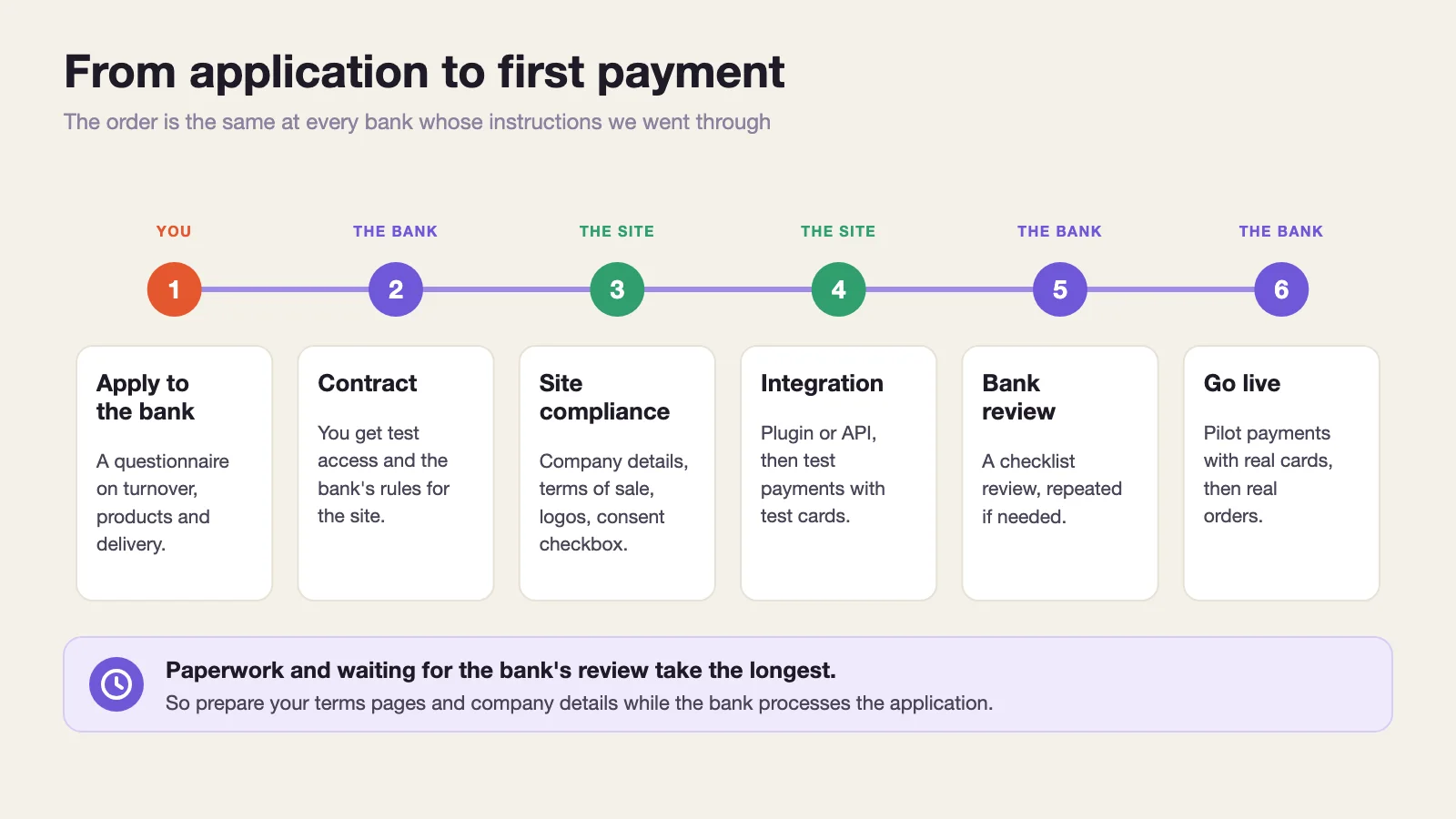
- Choose a bank and apply, with a questionnaire on turnover, products and delivery.
- Sign the contract. The bank gives you access to a test environment and its rules for the site.
- Bring the site in line with the bank's checklist: company details, terms-of-sale pages, logos and the consent checkbox at checkout.
- Connect the checkout to the bank (plugin or API) and try payments with test cards.
- The bank reviews the site. If something is missing, it sends a list of fixes, and the review can repeat several times.
- Pilot payments with real cards follow, together with bank staff, and only then go live.
Paperwork and waiting for the bank's review take the most time. The technical part is usually the shortest, especially when the site is built with the bank's checklist in mind from day one. So prepare your terms pages, company details and logos while the bank processes the application, not afterwards.
Cards on WooCommerce and custom sites
For WooCommerce, most banks have a ready-made plugin. Raiffeisen has an official plugin on WordPress.org, and OTP and ProCredit offer their own. Intermediaries such as Monri and AllSecure also have plugins and work with several banks.
Three things we learned on the Quinton project
- Bank plugins work with WooCommerce's classic checkout. Most don't support the new “block” checkout, so card payment silently fails to appear among the payment options, without any error. Check which checkout your site uses before you connect anything.
- The plugin installs with an English name (“Card Payments”). On a Serbian site the customer should see “Platnom karticom” and a short explanation, so we translated it.
- WooCommerce only shows the terms consent checkbox if you select a terms page in its settings. If you don't, customers pay without confirming anything, and that's exactly what the bank checks.
On a custom site (for example Next.js or Laravel), the connection goes through the bank's or an intermediary's API. It's more work, but you get full control over how the checkout looks. We have built direct bank connections, with no intermediary, for the DD Moto and Baby Style stores too, and payment integration is part of our website and online store development service.
If you're still choosing a platform, see our WooCommerce vs Shopify comparison. Shopify Payments doesn't work in Serbia, which also affects the choice.
Fiscal receipts, refunds and disputed payments
Card payment doesn't change your obligation to issue a fiscal receipt: the Tax Administration requires one for every online sale of goods, delivered to the customer. Merchants who sell only online issue it electronically, with a verification link, and can use the Tax Administration's free virtual fiscal receipt processor, V-PFR (Tax Administration FAQ). Merchants who also have a physical shop send a printed receipt with the goods, and an electronic one only with the customer's consent.
Settle one question with your accountant at the start: when a customer pays by card before you ship, do you issue an advance receipt at payment and a final one at shipping, or just one receipt? The rules leave room for both readings, and fiscal mistakes are expensive.
Customers have the right to withdraw from a distance purchase within 14 days. Under the Consumer Protection Law, whose new version applies from 2 August 2026, you refund them using the same payment method, no later than 14 days after you receive their withdrawal form. For cards, that means a refund to the same card, through the bank's portal or directly from the order if the plugin supports it.
If a customer claims they never received the goods or didn't make the payment, they can dispute it with their bank. Your bank then asks you for evidence. UniCredit's terms, for example, require you to provide it within three days and to have a proof of delivery signed by the customer, otherwise it debits your account for the full amount. So keep delivery notes and delivery confirmations.
Mistakes we have seen on projects
WooCommerce doesn't flag most of these on its own, so they only surface when a customer complains or the bank sends the site back for changes:
- Bank transfer enabled without an account number. The customer is told payment details are on the way and receives nothing.
- Bank transfer without a payment reference. WooCommerce has no such field, so payments are matched by hand from bank statements. We use the order number as the reference.
- Logos recolored to match the design. The bank requires the original colors.
- Placeholder company details left on the site. “Street and number” and a made-up phone number look real until the bank checks them.
- Unlimited quantity with cash on delivery. A fake order for several hundred units means packing and paying the courier before you see a dinar, so on Quinton we added a maximum quantity per order.
FAQ
Can customers from abroad pay by card?
Yes. Banks in Serbia accept foreign Visa and Mastercard cards too. The customer pays in dinars and their bank converts the amount into their currency. That's why banks require a currency conversion statement on the site.
Does the customer pay the fee?
No. The merchant pays the fee, and a card surcharge is forbidden. A discount for a cheaper payment method is allowed.
When does the money arrive?
From cards, usually the next business day, minus the fee. From IPS, instantly.
Can I accept cards without an online store?
Yes, with a payment link. You send the customer a link, for example in a message or email, and they pay on the bank's page. Some banks and payment institutions offer this, Payspot for example.
Is the process the same if I sell services?
Yes. Instead of delivery, your terms describe when and how the service is provided and what happens if the customer cancels.
In short
Card payment is now something customers expect, and the number of such payments in Serbia grows every year. Most of the work isn't technical: it's preparing the site to the bank's checklist and writing clear terms-of-sale pages. If you'd like us to handle it for you, from choosing a bank to the first payment, get in touch or see how we did it for Quinton.

 Let's talk about your project!